Showing posts with label productivity tools. Show all posts

Monday, May 2, 2016

How to Learn a Productivity System Part 2: Actions

The past 2 weeks were a disaster for my productivity system.

As a software project manager I oversea about 10 projects.  A couple of the bigger projects have a release cycle of 2 weeks. Effectively that means there is no down time, there is no week off because one project releases on even weeks and the other project releases on odd weeks.  The other 8 projects are smaller research projects, which require more hand holding because they have significant risks and exposure to the company’s senior leaders.

One of my colleagues was off for 3 days so I did a little filling in. Then the following week we on-boarded a new project lead which, in the end, is going to help tons, but requires a bit of time to properly train a new person.

During this 2-week period my inbox went from 0 to 357. And my stress level pegged the ‘overheat’ mark so I knew I was loosing a few things along the way. The really urgent things didn’t get lost because some of my co-workers reminded me through e-mail and phone calls that they needed something (which is kind of embarrassing to be asked twice or three times).  

In the end, the urgent and important got done, the important but not urgent things got done, most of the urgent and unimportant things were ignored, and the not important and not urgent items were totally ignored.

For a really detailed description of the time management matrix, see the article “How to Save a Million Years of Time in a Life Time.”
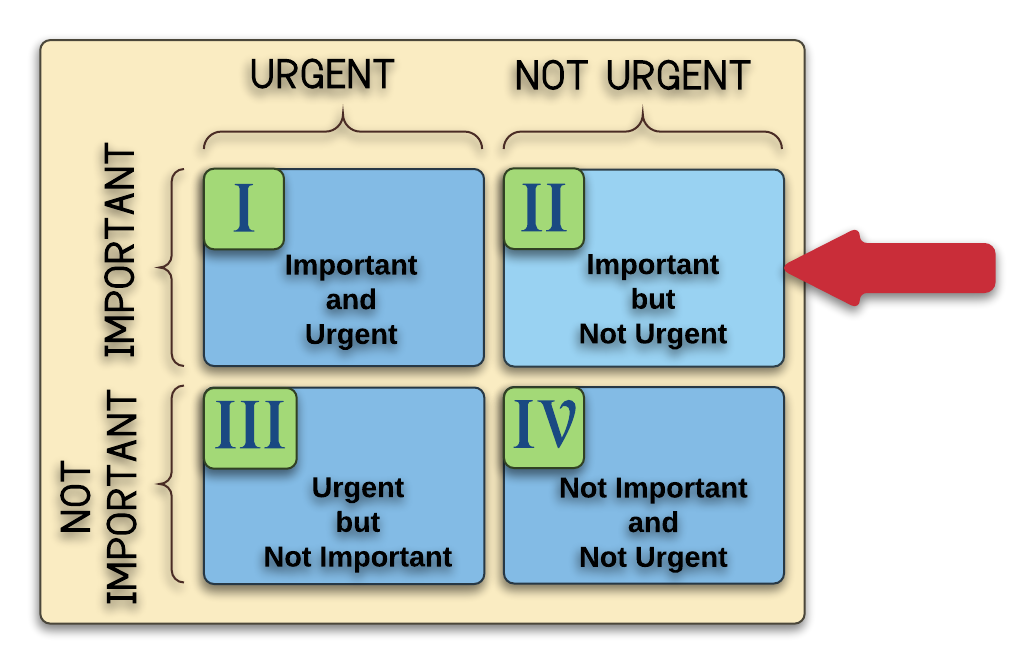
Time Mgmt Matrix
How does one setup a system that manages his or her time, ensuring the important things done in life in spite of a continuous flow of stressful weeks?


One effective strategy: Train thy self


Take special-forces training as an example. In the series “Surviving the Cut” special operations forces training includes: 

 
  • Ranger School
  • Air Force Pararescue
  • US Marine Recon
  • Special Forces Divers
  • Navy Explosive Ordnance Disposal (EOD)
  • Marine Sniper


Another great training example series is “Navy SEALs: BUDS class 234.”


Even if you haven’t seen these series, most of us have an idea about the rigor of this type of training.

What’s interesting in many documentaries that I’ve seen (including books and post mission interviews), is the comments from special operations veterans about how they execute and survive in very stressful combat situations. Many veterans say, “I trusted my training”.


"I trust my training"


Isn’t that interesting.

In the heat of battle these amazing individuals with highly tuned senses and unwavering courage and amazing tenacity relay on TRAINING.  

This is a huge lesson for us. So let’s get trained in our daily routine so we can handle office stress. Here’s is the training you need to keep it going.


#1 Setup the Routine and Tools


Routine is key. Almost every day of the year I’m reminded how important it is to have 
routines or systems to keep on track. After listening to podcasts with very successful people, you quickly see they incorporate systems into their life in order to achieve their desired results.  

One of my favorite podcast of all time is Tim Ferris’ interview with Scott Adams (Creator of Dilbert). In the podcast Scott Adams expresses how critical his daily systems are to his success.

In “The One Thing” by Gary Keller he says, “The more creative a person is, the more they need a system.” You’d think it would be the opposite of that. But Keller argues that without a system you will just become distracted instead of productively creative.

Suggested routine for home

Wake up on time. It’s key to force this behavior. You’ve faced more pain in your life than getting up, so you can do it.

Refuse to read e-mail or watch TV or even read the news. Getting distracted from your routine is easy, so make sure you keep the first part of your day clean from tempting distractions.

Work Out. (I alternate between Yoga and Running). This is important to your longevity, mental health, and ability to feel good and have energy.

Eat breakfast with your family.  I’m big on pouring into my family’s life first thing in the day. It helps myself, my wife, and my kids enter the day with a mindset of thankfulness, thoughtfulness, kindness, and a spirit that is eager to learn.

Go to work.


Suggested routine for work


Look at your Calendar first. Your time is a map of your daily activities and you need to know the landscape.  Don’t be distracted by e-mail inbox.  Look to the calendar first.

Designate the biggest appointments you need to accomplish today as “all day” appointments. These are not meetings, they are deliverables that you need to make. (e.g. “Schedule training for the software team,” “Make sure that contract is signed by Pete,” or “Get the Bid to Joe for Atlas Project.”)

Put these on your calendar for each day of the week.  Many of these come in e-mails. I’ve created a special button in Outlook to create meetings from e-mails so I can plop these items into the calendar quickly.
If you get projects and direction through e-mails put as many as possible into the calendar to keep yourself aware of the non-meeting deliverables.

Put non-urgent emails into an “!Action” folder at the top of e-mail box.
If the action comes in some other way besides e-mail, a phone call or post-it note, write yourself an e-mail for those actions and either put it into your “!Action” folder or into an “all-day” calendar event on the proper day.  


Too many “all-day” events


Don’t get bogged down with too many daily assignments. Challenge yourself to reduce the number of daily events down to 3. Distribute the rest to different days or delete them altogether. Or perhaps put them in the “!Action” folder to deal with later.

If you are frantic at work, you won’t be able to become less frantic without FOCUS. FOCUS requires elimination. FOCUS is the result of shedding things so you can become immersed in one thing. 

Review and update appointments daily.


#2 Refresh Your Mindset at Every Possible Interval


It’s so easy to get distracted during the day. Each time I come back to my computer from a meeting or discussion with my colleagues, I look at the calendar first, then at my e-mail inbox.  


All Day Calendar First


Put the three big things at the top of the calendar. These are the “Big Rocks” in the parlance of Stephen Covey’s 3rd Habit: First things First. Stephen does a seminar exercise where he has a glass bowl half full of small pebbles and then another bucket with big rocks. The big rocks have labels on them like, “work out” or “time with family” or “write a book.” Stephen asks for a volunteer from the audience to come up to the stage and attempt to put all the big rocks into the bowl with the pebbles. People usually start stuffing the big rocks into the glass bowl only to find they won’t fit. There’s a lot of struggling to push rocks into the pebbles, digging around pebbles, and finally total frustration. The big rocks won’t all fit, unless…

Stephen Covey suggests the person pour out all the pebbles into the bucket, put in all the big rocks and pour all the pebbles on top.  

Guess what. It all fits perfectly. That is why the big rocks must be done first.


Meetings on the Calendar Second


What is the next thing on my calendar and how can i prepare for it?


E-mail Third


Triage the incoming mass of information.
If I spend more than 5 minutes on triage and think I’m getting distracted, I go back to All-day events on my Calendar to make sure I can complete the Big Rocks.

Now you have something that looks like a routine.  This is the training you can fall back on. We are lacking a little of the supporting philosophy, but that will come. Understanding the philosophy is often the next level of training. 

Please leave a comment or send me e-mail and let me know what Big Rock you’re struggling to get done?


Monday, November 9, 2015

Change Your Meetings and Change Your Life with Meeting Facilitation (aka Meeting Magic)


This article talks about tools to improve productivity every day at your job.  How do I know it works? I've seen change for the better in relationships and in the output of my teams and colleagues.

In 1994 I graduated with a computer science degree and started working at a large telecom company which specialized in wireless telephone networks. From day one I learned that knowledge is power and expressing your well-informed opinions loudly and with passion can move you up the power curve in an organization.


As I navigated my way from “Member of Scientific Staff” (that was my title, no kidding) to “Senior Member of Scientific Staff” then “Individual Contributor/Architecture” and finally to “Software Development Manager” I found that my voice was heard more often if I used it loudly and forcefully.  The downside of an outgoing and dominant personality is that you get your way often, but you don’t always get the best from other people and you create friction along the way.


In 2005 I took a role at another company as a “Team Lead/Scrum Master” and used the same skills that I’d learned in the first decade of my career.  I noticed that other individuals also used the be-loud-and-dominate technique.  Now, when there were two leaders saying different things in the organization, two parties would form and the differing opinions would create a small turf war.


In 2008, after participating for 14 years in the party system of technical decision making, I took the role of department manager and I WAS SCARED SPITLESS because I was taking over leadership of an organization where I had participated in a system that rewarded loud and overbearing people; some of which I had offended by using my techniques of domination instead of collaboration.


WAKE UP CALL.


Faced with a department divided against itself, I realized I needed to drastically alter course.  So I studied hard to change my mindset and my behaviors. I read book after book and listened to people in the organization that showed management skills coincident with what I was learning in books.  


What I learned in these books and in my interactions with leaders in the organization is, I really need to behave with humility and try to draw out other people’s knowledge and skills.  And at the same time firmly demand discipline from myself and others to focus on solving problems and never drag the rhetoric of workplace or personal history into a arena where creativity and action are needed.


In 2011 I took a course called Agile Team Facilitation as part of my career development and also an Agile development initiative at my workplace. Read more about how a got involved in that course here. The material in the course not only reinforced all the learning in my post WAKE-UP CALL years, but also provided specific skills for applying collaboration and action into every interaction with teams of any size.  Instead of Facilitation, I call it Better Meeting Magic. Better Meeting Magic embodies the spirit of collaboration, inclusiveness and focus that can and will change the culture and productivity of a team, department, division or company. The results that I’ve seen in my current company reiterate the bold statement of change offered in this article.


Better Meeting Magic is pretty simple and includes the following meeting flow:


The description of the individual activities in Better Meeting Magic are as follows:


Planning
Know what you want out of a meeting before you go into a meeting
Opening
Introduce the overall meeting goals and agenda
Bias Check (optional)
Allow people to express themselves with specific activities to safely capture bias
Brainstorming
Collaborate and generate ideas
Narrowing
Remove duplicate thoughts, reduced decision set to a manageable number
Deciding
Decide what action(s) to take
Retrospective (optional)
Get feedback on how the meeting went or how comfortable people are with the outcome.
Closing
Summarize the meeting results and capture follow-up activities
Follow-up
Make sure minutes and actions captured during the meeting are addressed


You and your teams spend a lot of time in meetings. You need relief from unfocused discussion. You need a better way to increase output from your meetings by 2 to 4 times.  Better Meeting Magic can deliver all those things.


I will be posting a number of follow-ups to cover each specific activity.  Please stay tuned as I talk in depth about each component of Better Meeting Magic.


Please leave comments and tell me about the most frequently propagated meeting sin in your company.

Also, please signup to receive the free Productivity Guide and also subscribe to Productivity in a Mobile World blog.

Wednesday, October 28, 2015

Harness Siri to Capture Your Thoughts and Seamlessly Put Them Into Your GTD System

If you experiment with Siri you will find her both super helpful and terribly insufficient.  I both love and hate Siri for a number of reasons.  Let’s talk about the Siri love.

What I love about Siri for my GTD Productive Lifestyle

As a highly mobile person, I need someone to follow me around, sit in my car while I drive, walk beside me while stroll along, run beside me while I jog and basically capture and transcribe my shallow thoughts and deep thoughts throughout my daily routine.
No one in my house has volunteer for this job and I believe the salary that I’d need to pay someone to be my personal assistant is beyond my current budget constraints.  Therefore I have found Siri to be suitable pseudo personal assistant (in part).

Siri and the First Step of Getting Things Done: Capture Everything

Searching the web to find the perfect Getting Things Done capture application for the mobile device is a simple task because there are many to choose from.  But the daunting task is find the right one that really works for a particular user and routine.
As a busy professional I want technology to be my seamless and effortless servant in my Getting Things Done process architecture.  For the majority of GTD implementers the biggest challenge with Getting Things Done architecture is the Review step.  The second biggest issue is capturing the content in as few inboxes as possible so that you don’t wear yourself out trying to find all the things that you’ve captured.  The intention of making capture seamless and creating fewer inboxes is to make Review easier. 


Therefore GTD implementation would ultimately be easier from start to finish by automating capture as much as possible.  You know that every little simplification in life creates a little space for breathing, so let’s save a little time and reduce complexity in capture.

Siri and Simplification

This is where Siri comes in.  She does an OK job at capturing voice and turning that voice into text for future processing in your Getting Things Done implementation.
Remember that David Allen says the calendar is golden and should always be followed rigorously. your calendar is your highest priority list, so this list will always be a pillar in your system.  So the “Create Appointment” command to Siri is the pathway to organize your time sensitive events.  I often mix capture with process when it comes to the calendar.  In other words, when I realize I have something to schedule, I do it right then and there.  The alternative is to add an item to your inbox so that you will then add an event to your calendar later. I'll use paper when I'm in a meeting, but I use voice commands when walking, running or driving.
If you don’t instantly add something to your calendar in a capture/process moment, then you’ll just want to capture for future processing. Future processing might occur in the next 15 minutes or next 24 hours, but the important thing is to capture seamlessly and Siri does this through “Take Note” command or “Reminder me" command.
Prior to iOS 9.0 IO was a big fan iOS notes because I could combine it with IFTTT to synchronize my personal notes into one single tool.   Notes were great because you could dictate to Siri to capture a note and then an IFTTT rule would run to synchronize the notes with Evernote or Trello or a variety of other tools.  Here’s the weird part. After iOS 9.0, the synchronization only works with hand typed notes but does not work with dictated notes.  Wow that is frustrating.  In iOS 9.0 apple made Notes similar to Evernote by allowing notes to include fancy fonts and pictures, but apple broke the most effective tool that I know which is synchronizing with a GTD inbox such as Evernote or Trello or OmniFocus.

Reminders to the Rescue

As a technology aficionado and mobile app early adopter, I would not give up easily on the voice capture feature because I desperately needed to take notes with voice while on the run or driving.
Through some experimentation I determined that iOS Reminders work almost exactly like Notes.  In some cases even better than notes for my GTD implementation.  Here’s how it work.
Instead of “Take Note…” say “Make Reminder…” or “Remind me to check out Smart Passive Income podcast episode 172” (BTW, that's my current favorite episode).  Siri creates the reminder.  That’s OK, but it’s not in my GTD workflow system (e.g. Evernote, Trello, Omnifocus, etc).  What we need is a mechanism to put every captured thought or action into our regular system.  Let’s say the system we use is Trello (my favorite at this time).  You need an assistant to seamless transfer items from Reminders to Trello, Evernote or something else.

IF THIS THEN THAT Completes the Loop

http:/ifttt.comIf This Then That (IFTTT) is an incredible service that can help you connect various systems in your life. Technology has not aspired to the level of Star Trek where I can ask the computer to create an entire life management system and connect all the pieces together, but IFTTT is a serious step forward.  A core component of IFTTT is the recipe and within these recipes a person can literally plug together an amazing amount of disparate systems.  IFTTT is truly amazing in terms of the permutations of functionality that is achievable.
To close the loop I used IFTTT to synchronize my iOS reminders with a specific Trello Board and specific list.  If you were using Evernote, you would select a specific folder to drop in new reminders.
IFTTT runs in the background as intervals you decide and collects your Reminders into the target application.  In the meantime, you can continue to use Evernote to capture typed notes or you can convert all your typing and dictation to Reminders and only use Evernote for picture capture.  I find Evernote to be couple taps longer than Reminders, so I just use Reminders for everything except photo capture.

Review Your Inbox

After fixing up the IFTTT recipe and capturing your notes verbally or hand typed, you have a collection of things to process. This collection of stuff is in one place instead of possibly two or three.
Please try Reminders audio capture and let me know your experience?
Please subscribe to this blog and keep productivity improvements flowing into your life.

Monday, September 21, 2015

How to Get a Higher Education While you Commute

I’ve looked at the statistics for commuting duration and decided that I can get the equivalent of a master's degree while I commute to work and back home.  Master Degree programs vary widely in terms of credit hours, but according to my research an average master's degree usually requires about 36 Credit Hours.  Credit hours are measured as Contact Hours with a professor and then you add another 3 hours of homework.  That’s 4 hours or your personal time per credit hour.  Now multiply by 15 weeks (length of the semester) and your grand total for master’s degree is 2160 hours.


Now that we know how much a typical master degree costs in terms of hours, how long will it take me to get the equivalent education hours while I drive down the road? I’m glad you asked…


Let’s assume that you start your education at the moment you jump in the car and stop when you arrive at work.  We’ll assume the same scenario for the trip from work to home.  


Daily 1 Way Commute in Minutes
Years to Get Master's Degree
30
8.6
45
5.8
60
4.3
90
2.9
120
2.2

Based on the numbers in the table above it could take you anywhere from a little over 2 year to 8 ½ years to get the equivalent hours of education for a master’s degree.   You might be asking yourself a few questions…


  • Where am I going to find a college professor to ride along with me for the duration of my commute?
  • And how will I convince him or her to show up at my house right when I leave for work?
  • Can he or she find a way back to the college or university so I don’t have to drop them off?
  • How much is this going to cost me for the convenience and quality of this education?


Fortunately you don’t need to find that special college professor.  You’ve probably already hear of Audible.com by Amazon.  Audible is a subscription service that holds a vast amount of material for every kind of reader/listener.


For our use case of getting the equivalent of a master’s degree, I researched audible’s collection of “The Great Courses” audio books. I determined that Audible has approximately 400 titles “The Great Courses Titles” that sum to 6,300 hours of educational listening. NOTE: This is ONLY “The Great Courses” material which is a fraction of the content on Audible. Many of these titles are recorded by University Professors who hold Ph.D’s is the subject of interest.  FANTASTIC...you just found the professor that will ride along with you every day.


Caveats include
  • No face time with a real professor
  • No office hours
  • No homework
  • No accreditation for all your work
  • No group projects that are core for many master's degree programs


Nevertheless, you can learn a ton and apply a amazing amount of what you learn by consistently listening day after day.


Check out Audible.com.  Find some courses of interest from “The Great Course” or other self help or business.  DO NOT get a novel...unless you are pursuing Creative Writing or Literature. You need to be learning on your commute to invest the time.


Please leave comments and let me know about what kind of “Master’s Degree” you would like to get while you drive?


-All The Best, Steve.